Schema Evolution in Snowflake — a quick overview.
What is schema evolution?
Schema evolution refers to the ability of a database or data platform to adapt to changes in its data structure over time. This can happen in different ways, leading to distinct types of schema changes:
- Adding new fields — common when new data sources are integrated or when additional attributes for an existing entity are discovered.
- Removing fields — occasionally certain fields become obsolete, resulting in a cleaner and more efficient data model.
- Modifying field types — required when new data doesn't align with previous type definitions.
- Reordering fields — less common, but sometimes needed to improve accessibility or usability of the model.
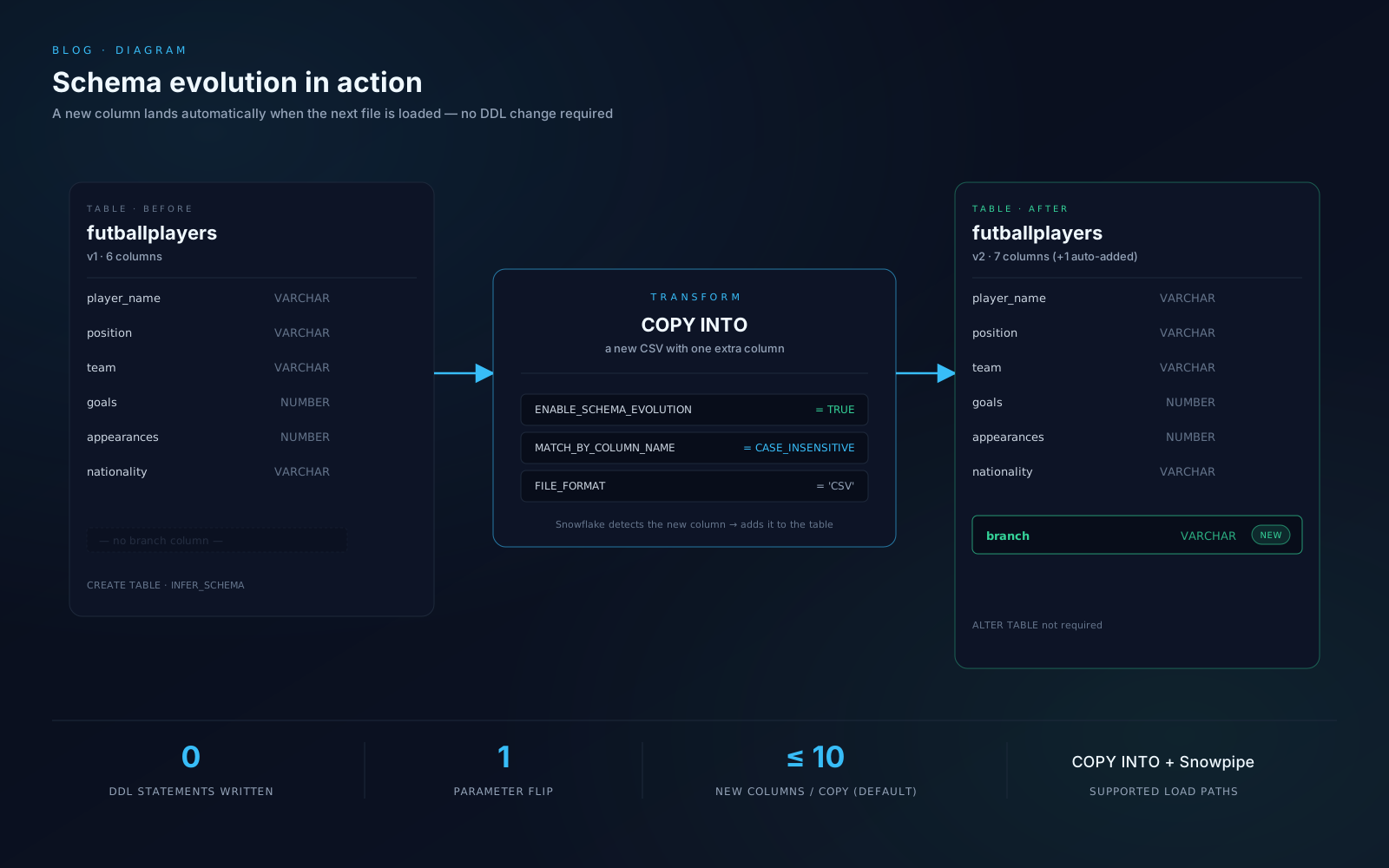
Key features in Snowflake
- Automatic column addition — new columns in incoming files are added to the target table without manual schema updates.
- Automatic constraint adjustments — a NOT NULL column missing in new files has the constraint relaxed to maintain compatibility.
- Flexible controls — enable schema evolution at the table level using the ENABLE_SCHEMA_EVOLUTION parameter, ensuring adaptability while maintaining governance.
Integration with the Data Lakehouse
In a Data Lakehouse setup, schema evolution plays a significant role in maintaining data consistency across the stages of transformation. It enables both schema-on-read and schema-on-write strategies, allowing the schema to be updated as required. This flexibility enhances discoverability, accessibility, and analysis. Flexible schemas that support evolution are vital for a company's data agility.
Benefits and use cases
The main advantage is the ability to adapt to business transformations. It allows expansion of data sources, addition of new application features, and integration of third-party systems without disrupting operations.
Limitations
- Limited to COPY INTO and Snowpipe — does not apply to INSERT operations.
- Not supported for Snowpipe Streaming via the Ingest SDK — though the Kafka connector does support schema detection and evolution.
- By default, schema evolution allows up to 10 new columns per COPY operation.
Even with these limits, it's still a great feature to use.
Conclusion
Snowflake's schema evolution simplifies data integration by automating schema adjustments, reducing manual intervention, and ensuring seamless compatibility with evolving datasets. In fast-paced environments, flexible schemas that support evolution are vital for data agility. Schema Evolution is a cornerstone for implementing a versioning system in databases.
Reference: Snowflake's official documentation on data load schema evolution.
Practice example
-- ===== PART 1: Set up file format, stage, and infer schema =====

CREATE OR REPLACE FILE FORMAT SNOWFLAKE_LEARNING_DB.Evolution.soccerplayers
  TYPE = 'CSV'
  COMPRESSION = 'AUTO'
  FIELD_DELIMITER = ','
  RECORD_DELIMITER = '\n'
  FIELD_OPTIONALLY_ENCLOSED_BY = '\042'
  ERROR_ON_COLUMN_COUNT_MISMATCH = FALSE
  PARSE_HEADER = TRUE;

CREATE OR REPLACE STAGE SNOWFLAKE_LEARNING_DB.Evolution.data;

LIST @SNOWFLAKE_LEARNING_DB.Evolution.data;

SELECT *
  FROM TABLE(
    INFER_SCHEMA(
      LOCATION   => '@SNOWFLAKE_LEARNING_DB.Evolution.data',
      FILE_FORMAT => 'csv'
    )
  );

CREATE OR REPLACE TABLE futballplayers
  USING TEMPLATE (
    SELECT ARRAY_AGG(object_construct(*))
      FROM TABLE(
        INFER_SCHEMA(
          LOCATION   => '@SNOWFLAKE_LEARNING_DB.Evolution.data',
          FILE_FORMAT => 'csv'
        )
      )
  );

DESC TABLE futballplayers;

-- ===== PART 2: Enable schema evolution and load wider data =====

ALTER TABLE futballplayers SET ENABLE_SCHEMA_EVOLUTION = TRUE;

-- Upload a new file (e.g. futballplayers2.csv) that includes
-- an additional "branch" column not present in version 1.
PUT 'file:///<path_to_local_file>/<filename>' @SNOWFLAKE_LEARNING_DB.Evolution.data;

COPY INTO SNOWFLAKE_LEARNING_DB.Evolution.futballplayers
  FROM @SNOWFLAKE_LEARNING_DB.Evolution.data
  FILE_FORMAT          = 'CSV'
  MATCH_BY_COLUMN_NAME = CASE_INSENSITIVE;

-- The new "branch" column is now part of the table definition.
SELECT * FROM futballplayers;